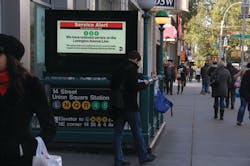
With indoor environments, everything is nice and comfortable. It does not rain inside, temperatures and humidity are controlled, the sun does not shine indoors, ambient light conditions do not change, the air is clean, power is consistent, the wind does not blow, and vandalism is rare. Basically, digital displays that are deployed indoors are in a controlled environment in virtually every respect.
However, in transit-type settings, everything changes — and it changes dramatically. Most transit venues are outside (like bus shelters) or semi-outside (like train platforms, subway entrances). Even when they are underground, these venues are not as clean and controlled as true indoor environments like shopping malls … not even close. Brake dust from trains/buses is also a major concern. Digital displays that are to be deployed in these areas are in an uncontrolled, harsh environment that is constantly changing. Anything can happen to them. Therefore, it’s important to consider the following factors and how they will affect your digital display initiative before choosing and deploying digital LCD displays:
- Direct Sun - Inside: None, Outside: Yes
- Temperature - Inside: 65-75° F, Outside: -30 to 120° F
- Humidity - Inside: Under 30 percent, Outside: Over 80 percent
- Rain, Snow, Dust, Dirt - Inside: None, Outside: Yes
- Brake Dust, Car Fumes - Inside: None, Outside: Yes
- Wind Load - Inside: None, Outside: Up to 100 mph
- Ambiet Light - Inside: Same all day, Outside: Changes througout the day
- Duty Cycle - Inside: 8-12 hours per day, Outside: 16-24 hours per day
The information above shows just some of the severe conditions outdoor digital displays have to endure over their indoor counterparts. They must be built to withstand direct sunlight, extreme temperatures, high humidity, rain, snow, dust and dirt, brake dust, harsh windy conditions and they also need to be protected from vandalism. It’s imperative to keep all of the above factors in mind when evaluating outdoor/semi-outdoor displays. While all of these factors must not be ignored, special attention should be given to the impact of the sun.
The sun puts out an incredible amount of energy that cannot be overlooked. Before placing displays in direct and indirect sun conditions, please consider:
- Sunny environments require high-bright displays for optimum viewing.
- Display luminance should normally be between 1,500-2,500 nits or candelas.
- Brightness should be measured through cover glass/film, not just at the surface of the LCD.
- Displays that maintain set brightness levels over time are highly preferred.
- Some displays will lose 10-12 percent brightness/year; this is not good.
- Some displays will lose 10-15 percent brightness in hot or cold ambient conditions; also not good.
Solar Clearing of the LCD screen is a concern. With direct sunlight and a backlight at full brightness, the LCD crystals receive a large amount of heat and could go through a phase change causing black blotches on the screen. This solar clearing will cause degradation in the display thereby reducing the operating life. To prevent solar clearing several factors must be addressed.
• LCDs are rated to different temperatures; 68°C, others 80°C and some at 110°C. The higher the better, so ask your hardware provider which LCDs they use and what the clearing point temperature is.
• CCFLs are inadequate for outdoors. Only use LED direct backlight systems. More reliable, longer life, less power consumption, better uniformity.
• Ambient light sensors should be used to automatically adjust backlight brightness based on light conditions.
• Avoid digital displays that are optically bonded to cover glass. If glass is broken then the expensive LCD is also lost.
• Cooling systems must be robust and reliable and consume minimum power and take up little space.
• The sun is worse in winter with clear skies/lower haze.
• East/West orientations are worst. North/South orientations are best.
• Rising and setting sun are the worst times of the day, not high noon.
There is a great deal to consider when thinking of how the sun alone will impact outdoor displays. The LCD is not the only critical component that is affected by the harsh environments. Most electrical components are rated up to certain temperatures and cannot be exposed to moisture or particulate debris. Consider the following when it comes to the impact of temperature and humidity on outdoor/semi-outdoor digital displays.
Transit displays must:
• Be designed for ambient temperatures down to - 30°F and up to 122°F.
• Be designed and validated for high temperatures and direct sun load.
• Have a display that is “sealed” to prevent condensation forming inside the cover glass.
• Have a start-up procedure for low temp power up if temperature is below - 30 F.
• Be designed for excessive shock and vibration (passing trains / buses)
• Plan for when the display is not to be run. Consider just turning off the backlight, not the entire digital display
• Have embedded electronics (player, modem, etc.) that are rated for internal display temperatures.
• Cooling is critical. Conventional A/C systems will drip, require maintenance and consume significant power. Pick a display that has the fewest failure mechanisms. If the cooling system fails, the display will too. Consider alternative cooling methods.
• Be prepared for how temperature fluctuations can affect brightness.
• Digital display AND mounting structure must be able to withstand significant wind loads. Have you thought about Gail winds, -hurricane force?
While the considerations related to sun, temperature, and humidity may seem overwhelming, once they are factored into your outdoor display purchase and deployment, you can rest easier knowing you have taken every precaution to protect your investment. Beyond environmental conditions, also mull over installation, operational and service conditions.
Other Considerations for Transit Displays
If you are thinking of placing your digital displays on or near public property, you would be wise to do the research about the area. Cities may require permits. There could be restrictions relative to full-motion video content or static transitions, especially near streets. What are the rules about nighttime operation? Many structures on public properties must be certified by a professional engineer and union or safety personnel may be required for the installation. Beyond government regulations, it is important to consider some of the more practical issues that are often times overlooked. Communication to your display through a wireless modem must be reliable. How is the cellular service in the area? Cellular service has proven to be more reliable than WI-FI. How will power be run to the display, and who is responsible for paying for it? Remember, outdoor displays consume three to five times more power than indoor. Furthermore, power comes in many different forms. It's a good idea to get a display that comes with a universal power supply of 85V to 265V.
The investment required to implement an outdoor digital signage campaign is not trivial, but don’t be short sighted and only consider the upfront capital costs (CapX). Take the time to find a hardware solution that minimizes the operational costs (OpX). While power costs can be easily calculated once you have the total annual power consumption, the service costs can be more unpredictable. Vandalism, power outages, periodic cleaning, and emergency maintenance can add up to a sizeable chunk of money. The following are specifications you should look for in an outdoor digital display:
• What type of cover/safety glass will be used? It must be able to withstand a beating.
• Glass should be separate from LCD screen. That way you can replace damaged glass without replacing LCD.
• Can the digital display be serviced in the “installed” position? Very important
• How easy is the service considering that repairmen be working in outdoor conditions (cold, rain, wind-blown dust)?
• How modular are the replacement components?
• Can the display be controlled, diagnosed, and updated remotely?
• Can the display report back to the NOC operational data and alerts?
• Can the embedded player, 3G modem and switch be automatically or remotely re-booted?
• How intelligent is the display? Can it verify that the "correct" image is being displayed on the screen?
• Are there provisions for the mini-UPS system so unit can “phone home” if it experiences a failure?
• What is the “sealing” rating of the display? NEMA 3, IP 55, etc.
• How is the unit protected from insects, rodents?
• The glass should have an anti-reflective (AR) coating to reduce reflections from eight percent to under two percent. (AR coating helps with reflections from buildings, cars, and direct sun.)
• Does the paint finish provide protection against harmful UV rays over time?
• What is the overall projected life-cycle of the display? 3 year, 5 years, 10 years? This factors into the ROI model.
Though there are many considerations and questions that come with properly deploying outdoor and semi-outdoor digital LCD displays in transit venues, the benefits of reaching the OOH (Out Of Home) marketplace are significant. The fact that these displays can provide day-parting and emergency alerts is huge. Advertisers can now decide when they want their ads run (Starbucks in the AM, McDonalds at noon, Bud Light in the evening) to better target there desired audience. City officials now have an immediate way of communicating schedule changes/delays to commuters and they can take control of the entire inventory of digital displays in case of an emergency like Hurricane Sandy in New York City. This is all possible by going digital.
In summary, remember:
Digital LCD displays for transit venues are not re-packaged indoor displays. Because of the unpredictability of the transit environment, outdoor displays must be both intelligent and robust and they need to have a long life-cycle to justify the investment.
With temperature variations, brake dust, constant vibration, sun load and the elements provided by Mother Nature, Transit venues do not provide for a comfortable living environment for Digital Displays. However, by researching and asking the pointed questions outlined above, you will be better prepared to select the best solution for your application
Peter Kaszycki is vice president of business development for Alpharetta, GA-based MRI, which provides indoor, outdoor and semi-outdoor digital displays ranging in size from 22 inches to 72 inches.
Kaszycki is also a speaker for the "Digital Signage Applications in Public Spaces" in the Vertical Industry Discussion Group on Thursday, 2/28 at Digital Signage Expo. For more information, visit www.DESnow.com.