When Should a Transit Agency Start to Worry About its Technology Infrastructure?
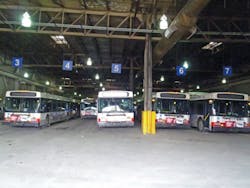
Technology infrastructure in a transit yard may not be at the top of most people’s minds, but there are some simple indicators that suggest when it’s time to be worried:
- When “yard visibility” means walking through the garage with a clipboard and a pencil
- When “software application integration” means looking at two different screens at once
- When “coordinated operations” means passing Post-it notes between departments
- When “intuitive GUI” is the green substance in the fridge which seems to be evolving some primitive intelligence
- When it just seems like there ought to be a better way to manage a yard
Indoor location systems are becoming widely adopted to solve all of these problems with a single solution. These location systems use sensors and tags to keep track of vehicles indoors just like GPS satellites and tags keep track of them outdoors. By knowing the precise location of vehicles and integrating this with information from maintenance, dispatch, scheduling and vehicle equipment databases, operators are gaining new visibility into their operations and control over their fleet of vehicles.
Yard Visibility
Does “yard visibility” mean referring to a handwritten markup sheet generated by a manual yard audit? Then it’s time to be worried about your technology infrastructure.
Markup sheets provide a simple visual reference for understanding where vehicles are located, but suffer from two key limitations: in any manual, repetitive process like a yard audit, mistakes can be made, and given the constant movement of vehicles, the information from any given yard audit is quickly out of date. Manual markup sheets are therefore not only costly in terms of the manpower required to perform the audits, but also in misguided decisions based on incorrect or out-of-date information.
An indoor location system can completely replace manual audits and markup sheets with an automatic, real-time vehicle location system. As mentioned, such a system operates much like GPS, with tags on vehicles being tracked not by satellites (which cannot see indoors) but by sensors mounted in the ceiling of the yard. This network of sensors updates the location of vehicles several times a minute with an accuracy of just a few feet. The result is an electronic markup sheet that shows the exact location and identity of all vehicles in the yard and updates that information constantly.
This is the core value of an indoor location system, and it was this that led Metro Transit in Minneapolis to be among the first to adopt such a system. The yard audit task typically took between 30 and 60 minutes, and with buses constantly in motion the data required constant updating. Audits were performed on an almost hourly basis, and were often out-of-date before a single round of the facility was complete. The inefficiencies of this process were clear to Metro Transit at different levels: in the time taken to collect the data; in the effects of inaccurate bus location data such as poor on-time departures due to blocked buses; and in the time wasted by maintenance staff searching for vehicles. Furthermore, inaccuracies in markup sheets had the potential to lead to buses with critical faults being erroneously dispatched onto routes, creating a potential safety hazard.
In order to realize the full potential of its location system, Metro Transit was quick to realize that having bus location information in electronic form created an opportunity to bring together multiple software systems.
Software Application Integration
Does software application integration mean running different applications on different computers and manually entering information from one system into the other? Then it’s time to be worried about your technology infrastructure.
Once the markup sheet is in electronic form, a huge amount of added value can be incorporated into the map view of the yard. The first software integration point is to connect the electronic map with the vehicle equipment database so that a simple mouse-click on any vehicle icon reveals a wealth of information: bus length, diesel or hybrid, wheelchair accessible, etc. Some of these attributes can also be indicated visually using different icons and colors making the once-limited markup sheet a rich source of useful information-at-a-glance. Need to find the next available hybrid that is ready to be dispatched? Electronic surveillance contractor needs a map of all the buses with DVRs? With the right indoor location system, integrated with a vehicle information database, that information is reliably available all the time.
Metro Transit went one step beyond this, however, and also integrated information from the dispatch and maintenance systems. This allowed the map display to show not only vehicle attributes, but also route assignments and maintenance status. In the case of maintenance, the bus icon would change to show a minor or critical fault so that a dispatcher had immediate feedback if a vehicle was not ready to be assigned to a route. In doing this the “electronic markup sheet” created by the indoor location system leapt from being a tool used to more easily identify and find vehicles, to a critical component of dispatch efficiency and maintenance safety. Indoor location systems had started along the path to coordinating a number of yard operations.
Coordinated Operations
Does “coordinated operations” mean picking up the phone or leaving a note to pass critical information between departments? Then it’s time to be worried about your technology infrastructure.
When the Réseau de transport de Longueuil (RTL) public transportation service in Longueuil, Quebec, adopted an indoor location system the technology had become more than a yard information tool: it was now a yard automation tool. With a rich set of integrated data deeply linked to bus location, RTL was able to streamline many operations simultaneously improving quality of service and efficiency.
At RTL, the electronic map display can not only be used to provide data about vehicles, but also to perform operations like assigning buses to routes, assigning drivers to buses, etc. To assign a bus to a route, a dispatcher simply has to drag-and-drop a bus icon onto one of the routes displayed in a list. Any bus showing a critical fault will immediately be rejected to prevent safety issues. When a driver arrives at the start of a shift he approaches an electronic kiosk where he swipes his smart card to be given his route and bus assignment, along with a map showing where the bus is located. Digital displays throughout the yard help direct him to the bus to expedite pullout.
This is a typical example of how operations can be coordinated once all information is integrated into one place along with the exact location of the vehicle. These operations can be as diverse as dispatch, maintenance, revenue drop, cleaning, fueling, etc. As more information is integrated into a single application, more decision making can be automated. Trying to dispatch a bus that hasn’t been fueled? Attempting to retrieve a bus for maintenance that is currently being cleaned? Many such issues can be easily avoided with real-time knowledge of the status and location of vehicles.
Full integration of data sources can go well beyond simplifying route allocations and bus finding, and catching errors that could cause issues: indoor location systems are already taking yard automation into the realm of “smart yards” with such applications as automatic parking modules.
In any bus yard there is a good deal of overnight shuffling as buses are rotated through cleaning, fueling, maintenance, etc. In the confined quarters of many indoor yards, blockage causes a lot of time to be wasted in shunting vehicles, but there is a smarter way. Given knowledge about the dispatch order in the morning and the overnight maintenance requirements, an algorithm can define the optimum disposition of vehicles as they are parked in order to minimize issues caused by blockage. Once again, by integrating multiple data sources and with reliable knowledge of vehicle location, a driver can be directed using digital signage to the optimum parking location.
Accessing that much integrated information can be daunting unless there is an easy way to view and use the data. That requires a user interface which anyone can use, with minimal training, and without being forced to throw your coffee mug at the computer screen.
Intuitive User Interface
Does “Intuitive GUI” remind you more of the life forms evolving in your fridge than the user interfaces for your current computer applications? Then it’s time to be worried about your technology infrastructure.
Most people today have become rather adept at using graphical user interfaces (GUIs), and a well thought out GUI can make your computer experiences much simpler. We are also very comfortable thinking about things in the form of a map: it makes sense to us to picture a transit yard as a top down view into the facility — like pulling the roof off and looking inside.
A well-designed indoor location system has just such an interface: displaying vehicle location and identification over a map of the facility (or facilities — many operations span multiple sites). As mentioned previously, the icons that represent vehicles are often color coded or overlaid with other symbology to indicate critical information just by looking at the map. Maintenance status, vehicle type and home-garage for multi-garage operations are all typical examples of information that are displayed graphically.
By clicking on a particular vehicle a user can drill down into a rich set of information which might include details about the vehicle and its onboard features and equipment, maintenance records, route and driver assignments and any other relevant information. The key is that the information is easily accessed through an intuitive map display.
Another element of a well-implemented system is the ability to easily search for vehicles. Whether that search is for a particular vehicle, or all vehicles that have yet to be fueled, or all kneeling, hybrid, articulated buses with onboard passenger counting, the ability to enter a search term and have the results instantly displayed on a map is a critical function of location systems.
Today, indoor location systems are replacing manual markup sheets with reliable, up-to-date electronic maps showing all vehicles across one or many facilities. By integrating this information with other data sources, indoor location systems are streamlining and error-proofing dispatch and pullout, helping drivers and others find their allocated vehicles, improving maintenance efficiency and optimizing parking to avoid time wasted due to blockage. But what of the future? What is coming next, and when?
A Better Way
When you are surrounded by paperwork, trying to use computer applications that frustrate more than they help, the best way to know what’s going on is to get up and walk the yard. Do you think that there must be a better way to manage a yard? Then it’s time to get excited about your technology infrastructure.
Indoor location systems are transforming yard operations first by providing yard information, then yard automation. But how far can that go? What is the ultimate smart yard? A few “day in the life” vignettes can help illustrate where indoor location systems can take yard management.
The driver arrives at the yard at the start of his shift and approaches the electronic kiosk. When he swipes his smart card he not only clocks-in for his shift, but also receives his day’s driving assignment and a map to the bus he has been allocated. As he walks through the garage digital signs help direct him to his assigned bus. When he reaches the bus he’s happy to see the one parked in front just pulling out: good – no blockage and no late-pullout today. On his inspection of the bus he notices a flat tire: this bus is going nowhere. He reports this using his mobile device — a few taps on the touchscreen and he is given his new bus assignment and a map of its location. This time there is no blockage and no flat tire, and he pulls out on time despite the hiccup.
During the day he notices a vibration through the steering column and takes a moment to report it on his touchscreen console in the bus. Maintenance will take care of that. When he arrives at the yard at the end of the shift he is directed to the next available revenue drop, then given instructions and a map about where to park the bus.
The dispatcher has already defined the route requirements when the day starts. Each route has been flagged with vehicle requirements: one route, for example, requires a hybrid bus with a particular vinyl wrap advertising an upcoming movie: this is a route through the city center. When all of the route requirements are defined, the auto-dispatch module takes a few moments to allocate buses to routes based on the bus type and configuration, maintenance status and position in the yard. The plan is optimized to avoid any blockage and ensures that the right bus is allocated to the right route with the right driver. The driver will get his assignment when he clocks-in with his smart card.
During the pullout process one driver reports a flat tire, immediately activating the auto-dispatch module. The bus is flagged for maintenance pickup and the entire remaining dispatch plan is redone to ensure that the correct buses still pull out on time and onto the correct routes. Account is taken of the fact that the disabled bus is now blocking all buses in the row behind it, and all affected drivers get their revised bus assignments on their mobile devices.
At the end of the day maintenance reports that one bus has a critical fault causing a steering vibration and that the estimated repair time is 22 hours. Once again the auto-dispatch module updates the pullout plan, and the auto parking module adjusts its parking assignments for the rest of the buses as they come in to ensure minimum overnight shuffling.
The maintenance worker gets an alert on his mobile device that a bus has a flat tire and is directed to its location. The wheel can be changed on-site, and when complete he registers the fault as rectified and the auto-dispatch system reincorporates that vehicle into its plan.
Later that day he receives another alert directing him to the right location to pick up a bus with a steering column vibration. When he starts the bus he is notified that diesel pump #3 happened to be free and is directed to take the opportunity to fill the tank. When he arrives at the pump, the bus identity and type is automatically registered and the pump activated since the fuel type is a match. When full, the pump flags the bus as refueled and records the amount of diesel used into the bus’s record.
In the maintenance shop the worker runs through some tests and concludes that the bus requires a new wheel hub and one will have to be ordered. That information is immediately sent to the auto-dispatch system along with an estimated repair time, and the maintenance bay is flagged as in-use for the duration of the repair period to ensure that it is not mistakenly allocated to any other vehicle.
In the future all yards will be run this way, and many like Metro Transit, RTL and several other large municipalities are already taking significant steps down this road. So, how far into the future is the vision of the smart yard? Jetsons far? Not at all — the building blocks are already in place and software applications are maturing rapidly. The fundamental foundation of location systems and data integration are already available, with the automation modules either already available or in development.
When should a transit agency start worrying about its technology infrastructure? If it doesn’t already have an indoor location system strategy. Search the web for “transit yard automation” to get a feel for what’s available and the benefits that many agencies are already enjoying.
Adrian Jennings serves as the vice president of technology for Ubisense Inc.
About the Author
Adrian Jennings
Adrian Jennings serves as the vice president of technology for Ubisense Inc., a leading provider of location solutions. Prior to joining Ubisense, Jennings was the president and CTO of Time Domain, a technology provider for both civilian and military use. Jennings also served as the leader of the UK Foreign Material Exploitation team, and became the designated UK intelligence expert for command guided missile systems. Jennings also spent three years with the US Department of Defense as an international technical liaison. Jennings received a master's degree in physics from Oxford University under an apprenticeship from the UK Ministry of Defense. He can be contacted at [email protected].